EYSC Player Safety
The steps outlined below will help you navigate the process of obtaining your clearances to be a part of the Ephrata Youth Soccer Club. These are guidelines put in place by our governing body- so although we understand the great deal of time and effort needed to go through this process- it is 100% necessary for not just coaches, but also for volunteers and all board members.
The Ephrata Youth Soccer Club is committed to the safety of our youth!
Let’s Connect.
Let us know you are interested in getting involved.
Contact any member of the EYSC board to get started.
CURRENT OPPORTUNITIES
MINI MOUNTS COORDINATOR
The Mini Mounts Soccer Coordinator manages the season to provide a fun and structured first soccer experience for the club’s youngest players. This position oversees roster organization, coach recruitment and compliance, scheduling, and key logistics while serving as the main point of contact for volunteer coaches. It’s a seasonal role designed for someone organized, computer-proficient, and enthusiastic about fostering early youth development.
FUNDRAISING COORDINATOR
The Fundraising Coordinator is a flexible volunteer role focused on organizing at least one major fundraiser per season to support the club and provide opportunities for players in need. The current priority involves managing the distribution and sales of community discount cards, building on relationships with local business partners such as Two Cousins, Pourman’s Brewing, and Kona Ice.
U6 COORDINATOR
The U6 Soccer Coordinator oversees the season to ensure a safe, fun, and well-organized introduction to soccer for young players and their families. This role manages team formation, coach recruitment and compliance, scheduling, uniforms, and communication, while serving as the primary support resource for volunteer coaches. It’s a seasonal opportunity ideal for an organized, dependable individual who is passionate about youth development and community impact.
U8 COORDINATOR
The U8 Soccer Coordinator leads division operations to create a positive, development-focused soccer experience that emphasizes sportsmanship and teamwork. Responsibilities include recruiting and supporting coaches, forming balanced teams, managing schedules and referees, and ensuring all safety and training requirements are met. This seasonal role is well-suited for an organized communicator who enjoys working with volunteers and supporting youth sports.
Clearances
The next step in volunteering is to set up your GotSport profile in order to be able to complete the required clearances.
This takes a bit of communication with Risk Management to prevent creating multiple accounts and getting things set up properly. If you already have a GotSport account set up from registering a child, we may just need a few bits of information in order to add your “new role” to your profile.
Email Risk Management to get started.
After we have everything set up- the clearance requirements listed below will appear on your dashboard.
1

REQUIRED CLEARANCES
- PA State Police Criminal History (valid 5 years)
- PA Child Abuse History (valid 5 years)
- FBI affidavit or FBI fingerprints (valid 5 years)
- Concussion Training (annual)SafeSport Training (annual)
- Eastern PA Risk Management (annual)
- Communicable Disease Agreement (annual)

2
PA CHILD WELFARE HISTORY
To get your PA Child Abuse Clearance go to: www.compass.dhs.pa.gov/cwis/public/home
This clearance is good for 5 years- if you have a current clearance for work or otherwise, you do not need to obtain again- simply upload to GotSport.
- Create an individual account. * No charge- clearance fees are waived one time every five years for volunteers
- Follow the steps as directed.
>> You will need to know all your previous addresses, as well as the names and ages of all those you’ve lived with.
No charge- clearance fees are waived one time every five years for volunteers.
Allow up to 14 days for results. Proof of Clearance for the PA Child Welfare History will come by mail in the form of a certificate. You will also be able to print/save a copy from the website – so be sure to notate your login & password information.
When you receive your clearance: log into www.system.gotsport.com
Go to the dashboard, click “more info” beside PA CHILD WELFARE HISTORY and upload your report.
3
FBI FINGERPRINT OR AFFADAVIT
The FBI Fingerprint Background check is only needed if you have ot lived in PA for the last 10 consecutive years.
If you have not lived in PA for the last 10 consecutive years- to go https://uENROLL.IDENTOGO.COM
Enter Service Code 1kg738
Cost for the FBI Clearance is typically between $20-$30
This clearance is good for 5 years- if you have a current clearance for work or otherwise, you do not need to obtain again- simply upload to GotSport.
>> If you have lived in PA the last 10 consecutive years- simply complete the Affidavit of Compliance.
Allow up to 14 days for results. Proof of Clearance for the PA Child Welfare History will come by mail in the form of a certificate. You will also be able to print/save a copy from the website – so be sure to notate your login & password information.
When you receive your clearance: log into www.system.gotsport.com
Go to the dashboard, click “more info” beside FBI FINGERPRINT OR AFFIDAVIT and upload your report.
4
PA STATE POLICE CRIMINAL HISTORY
To get your PA Background Clearance go to: https://epatch.pa.gov/home
This clearance is good for 5 years- if you have a current clearance for work or otherwise, you do not need to obtain again- simply upload to GotSport.
NOTE: must access through Internet Explorer, Microsoft Edge, Firefox, and Chrome (does not work on Safari)
NOTE:
Proof of Clearance for the State Police check will be online only.
You will need to login using the info you receive when fill-in gout the online form to access when your clearance is processed.
When you receive your clearance: log into www.system.gotsport.com
Go to the dashboard, click “more info” beside PA STATE POLICE CRIMINAL HISTORY and upload your report.
5
CONCUSSION TRAINING
Go to: https://www.train.org/cdctrain/
If you already have a TRAIN account (TRAIN National, or a state TRAIN account), enter your login name and then your password and select Login. If you do not have a CDC TRAIN account, click the Create an Account link.
Follow the steps as directed. Be sure to complete Your Profile Information in order to continue.
When selecting the Group- Select CDC, Under National/CDC- Select Academia & Research. Under National/Pennsylvania, select Other (my organization isn’t listed), then Lancaster, then Non-EMS.
In the profile set up, the Organization should be listed as Ephrata Youth Soccer Club, Professional Role- Volunteer, Work Setting- Other- Youth Soccer Club.
Then register for a HEADS UP to Youth Sports Course:
Select the appropriate link below to go to the course you need to take for HEADS UP:
The course details will load for the course. Please read carefully for any instructions.
To register, select the green Pre-Assessment tab.
The pretest will load in a new tab. Please select the Start Assessment button.
When you have completed the pre-assessment, please exit the tab. CDC TRAIN will still be open in another tab. Select the Launch course button to begin the course.
If you need to leave the course prior to completing it, TRAIN will hold you in progress. You can return to the course by logging back in to CDC TRAIN and selecting Your Learning on the home page. Your course will be listed here. Click on the In Progress link to re-launch the course.
Once you have completed the course, select the course exit button to close the course.
CDC TRAIN will still be open in the browser. Select the Assessment Pending button to begin the post assessment.
Once you have completed the post assessment, close the tab to return to CDC TRAIN. If you passed the post assessment with an 80 or higher, a certificate will be place in your certificates in CDC TRAIN (Your Learning/Your Certificates). If you fail, you may retake the post assessment.
Click here for a detailed tutorial PDF.
When you receive your certificate: log into www.system.gotsport.com
Go to the dashboard, click “more info” beside CONCUSSION TRAINING and upload your report.
6
EASTERN PA YOUTH SOCCER RISK MANAGEMENT
Go to: www.system.gotsport.com
Go to the dashboard, click “more info” beside EASTERN PA YOUTH SOCCER RISK MANAGEMENT
Then click on “Submit New Report”
Review, Check Boxes (if correct), Sign & hit Submit
7
SAFE SPORT
Go to: www.system.gotsport.com
Go to the dashboard, click “more info” beside SAFE SPORT
Then click on “Launch Course”
Complete information on “Sign Up” page. *please enter the information for a new account. If you have previously taken any SafeSport training, click Login (upper right of screen) to access your existing acount, enter the email address you used then click Forgot Password.
If prompted, log in to the new or existing account
Click on “Menu” and select “Catalog”
Click the Start button for applicable training
a) SafeSport Trained – First training for adult coaches/trainers/managers
b) Refresher – Second and subsequent training for adult coaches/trainers/mangers
c) SafeSport Trained for Adult Athletes – Training for athletes 18 and over
Upload your certificate of completed to GotSport. **Currently, all certificates of completion must be manually uploaded to GotSport.
Instructions for downloading a certificate:
1. Select the “Menu” icon at the top right of your page.
2. Select “Transcript”
3. Under Certificates Section, click on Download next to the most recently completed course
8
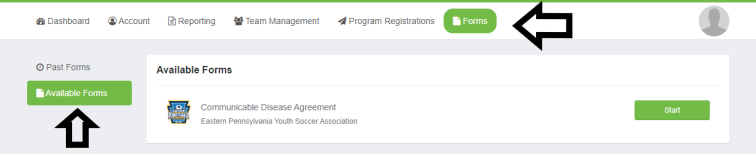
COMMUNICABLE DISEASE AGREEMENT
Go to: www.system.gotsport.com
Go to Forms, then, Available Forms
The agreement requires a signature
9
PROFILE PICTURE
Go to: www.system.gotsport.com
Select Account, In the Profile tab, select edit image to add your profile picture.
If you have issues, feel free to email your picture to RiskManagement.
10
CELEBRATE!!!
We are so very grateful for your time and dedication to the Ephrata Youth Soccer Club.
We could not do this without you!!!
 EPHRATA YOUTH SOCCER CLUB